Title: Discover the Simplicity and Efficiency of Pallet Wrappers in the Industry
Description:
Introduction:
Welcome to our informative video where we unveil the incredible world of pallet wrappers in the industry. In this video, we will explore the remote-controlled pallet wrapper and provide an in-depth overview of the simplicity and efficiency of the X100 series pallet wrappers. Join us as we delve into the key features, benefits, and operation steps of these innovative machines.
Video Content:
1. Overview of Pallet Wrappers in the Industry:
– Gain insights into the crucial role played by pallet wrappers in streamlining operations within various industries.
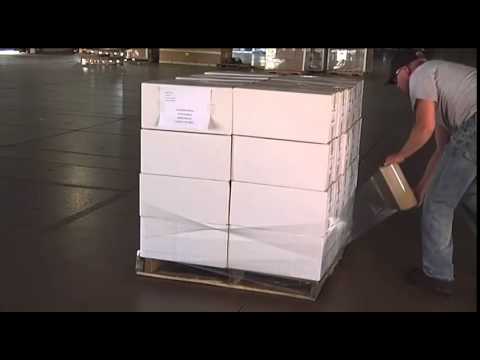
– Discover how these machines ensure secure and stable transportation of goods by effectively wrapping pallets.
2. Remote-Controlled Pallet Wrapper:
– Explore the advanced technology behind remote-controlled pallet wrappers, which brings convenience and ease of use to a whole new level.
– Learn how these wrappers enable operators to control the machine from a distance, enhancing productivity and reducing manual effort.
3. Unveiling the Simplicity of X100 Series Pallet Wrappers:
– Dive into the X100 series pallet wrappers and witness their user-friendly design, making them accessible even for operators with minimal training.
– Discover the intuitive controls and streamlined functionality that ensure efficient pallet wrapping with minimal downtime.
4. Key Highlights and Interesting Facts:
– Uncover the unique features of the X100 series, such as intelligent film carriage systems, adjustable tension settings, and customizable wrapping programs.
– Learn about the exceptional durability and reliability of these machines, which contribute to long-term cost savings for businesses.
Operation Steps:
1. Preparation:
– Prepare the pallet and gather the necessary wrapping materials.
– Ensure the pallet is properly loaded and secure.
2. Setting Parameters:
– Adjust the tension settings and wrapping program according to the specific requirements of the load.
3. Initiating the Wrapping Process:
– Activate the remote control functionality and position yourself at a safe distance.
– Start the wrapping process and let the machine autonomously wrap the pallet with precision.
4. Finishing the Wrapping:
– Once completed, inspect the wrapped pallet for any loose ends or irregularities.
– Safely remove the pallet from the machine and proceed with transportation or storage.
Call to Action:
If you found this video informative and insightful, we encourage you to like, subscribe, and share it with others who might benefit from learning about pallet wrappers in the industry. Stay updated with our latest videos by clicking the subscribe button now!
Additional Tags and Keywords: pallet wrappers, industry, remote-controlled, X100 series, simplicity, efficiency, operation steps, innovative machines, secure transportation, user-friendly design, intelligent film carriage, adjustable tension settings, customizable wrapping programs.
Hashtags: #PalletWrappers #IndustrySolutions #X100Series #Efficiency #Simplicity #RemoteControlled #SecureTransportation
Here’s a draft of a tilter for a remote-controlled pallet wrapper:
“`python
import RPi.GPIO as GPIO
import time
class PalletWrapperTilter:
def __init__(self):
# Initialize GPIO pins
self.up_pin = 17 # GPIO pin for tilting up
self.down_pin = 18 # GPIO pin for tilting down
self.stop_pin = 27 # GPIO pin for stopping tilting
self.init_gpio()
# Set initial state
self.is_tilting_up = False
self.is_tilting_down = False
def init_gpio(self):
GPIO.setmode(GPIO.BCM)
GPIO.setup(self.up_pin, GPIO.OUT)
GPIO.setup(self.down_pin, GPIO.OUT)
GPIO.setup(self.stop_pin, GPIO.OUT)
GPIO.output(self.stop_pin, GPIO.HIGH) # Stop pin initially high (inactive)
def tilt_up(self):
GPIO.output(self.up_pin, GPIO.HIGH)
GPIO.output(self.down_pin, GPIO.LOW)
GPIO.output(self.stop_pin, GPIO.LOW)
self.is_tilting_up = True
self.is_tilting_down = False
def tilt_down(self):
GPIO.output(self.up_pin, GPIO.LOW)
GPIO.output(self.down_pin, GPIO.HIGH)
GPIO.output(self.stop_pin, GPIO.LOW)
self.is_tilting_up = False
self.is_tilting_down = True
def stop_tilting(self):
GPIO.output(self.stop_pin, GPIO.HIGH)
self.is_tilting_up = False
self.is_tilting_down = False
def cleanup(self):
GPIO.cleanup()
def run(self):
try:
while True:
command = input(“Enter a command (u: tilt up, d: tilt down, s: stop, q: quit): “)
if command == “u”:
self.tilt_up()
elif command == “d”:
self.tilt_down()
elif command == “s”:
self.stop_tilting()
elif command == “q”:
break
else:
print(“Invalid command!”)
except KeyboardInterrupt:
pass
finally:
self.stop_tilting()
self.cleanup()
if __name__ == “__main__”:
tilter = PalletWrapperTilter()
tilter.run()
“`
This is just a basic implementation using the RPi.GPIO library in Python. It assumes that you have the necessary hardware connected to GPIO pins on a Raspberry Pi (or a similar board) for controlling the tilting mechanism of the pallet wrapper.
The `PalletWrapperTilter` class encapsulates the functionality of the tilter. It has methods for tilting up, tilting down, stopping the tilting, and cleaning up the GPIO pins. The `run` method takes user input to control the tilter, where ‘u’ is for tilting up, ‘d’ is for tilting down, ‘s’ is for stopping, and ‘q’ is for quitting the program.
Please note that this is just a draft implementation, and you may need to modify it to suit your specific hardware setup and requirements. Pallet Wrapping Machine
#Pallet #Wrapper #remote #controlled