Title: Robotic Palletizers: Maximizing Efficiency in Food Grade/Washdown Operations | RS080N Robot Model
Description:
Introduction:
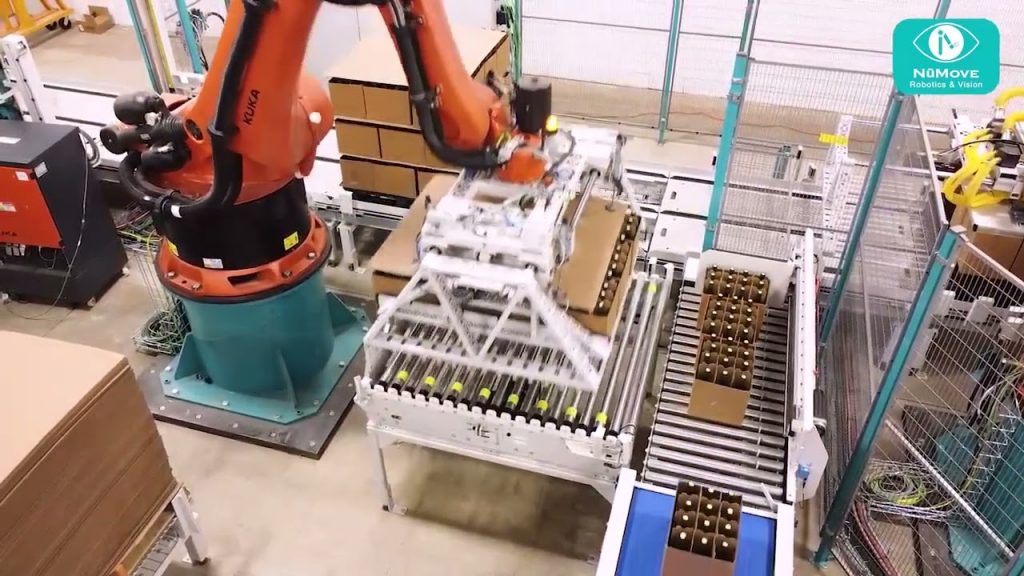
Welcome to our showcase of Robotic Palletizers, specifically the Kawasaki Robot Palletizer Cell featuring the Food Grade/Washdown Turnkey Operation for Frozen Blueberry/Fruit Cases. In this video, we will delve into the details of the RS080N Robot Model, highlighting its features, benefits, and its role in optimizing palletizing processes in the food industry.
Video Content:
Our video provides a comprehensive overview of the Robotic Palletizer Cell and its application in food grade and washdown environments. We explore the step-by-step operation of the Kawasaki RS080N Robot Model, showcasing its capabilities in efficiently palletizing frozen blueberry and fruit cases.
Key Highlights:
1. Unparalleled Efficiency: The RS080N Robot Model offers exceptional speed and precision, ensuring swift and accurate palletizing of frozen blueberry and fruit cases. This results in increased productivity and reduced labor costs.
2. Food Grade/Washdown Compliance: With its robust design and stainless steel construction, this palletizer is specifically engineered to meet the stringent requirements of food grade and washdown operations. It adheres to strict hygiene standards, making it ideal for the food industry.
3. Turnkey Operation: Our turnkey solution ensures seamless integration of the RS080N Robot Model into your existing production line. This eliminates the need for complex setup processes, saving valuable time and resources.
4. Versatility: The Kawasaki Robot Palletizer Cell can handle various case sizes and weights, providing flexibility to accommodate different product configurations. This adaptability is crucial in the dynamic food industry.
Call to Action:
If you found this video informative, please give it a thumbs up and consider subscribing to our channel for more industry insights and product showcases. Don’t forget to share this video with your colleagues who might benefit from learning about the efficiency and capabilities of Robotic Palletizers.
Additional Tags and Keywords:
Robotic Palletizers, Robotic Palletizer Cell Showcase, Kawasaki Robot Palletizer Cell, Food Grade, Washdown, Turnkey Operation, Frozen Blueberry, Fruit Cases, RS080N Robot Model, Palletizing Efficiency, Food Industry, Productivity, Labor Costs, Hygiene Standards, Stainless Steel Construction, Turnkey Solution, Case Handling, Adaptability.
Hashtags:
#RoboticPalletizers #PalletizerCell #KawasakiRobot #FoodGrade #Washdown #Efficiency #RS080N #FrozenBlueberry #FruitCases #TurnkeyOperation #Productivity
Sure! Here’s a sample tilter program for a Robotic Palletizer Cell Showcase:
“`python
import time
def tilter_control(angle):
# Code to control the tilter based on the desired angle
# This can include sending commands to the tilter’s motor or servo
# Assuming the tilter takes some time to reach the desired angle
time.sleep(1) # Adjust the sleep time as per the tilter’s response time
def showcase_tilter():
print(“Robotic Palletizer Cell Showcase – Tilter”)
while True:
print(“n1. Tilt to a specific angle”)
print(“2. Exit”)
choice = input(“Enter your choice (1/2): “)
if choice == “1”:
angle = float(input(“Enter the desired tilt angle in degrees (0-90): “))
if 0 <= angle <= 90:
print(f"Tilting to {angle} degrees...")
tilter_control(angle)
print("Tilting complete!")
else:
print("Invalid angle. Please enter a value between 0 and 90.")
elif choice == "2":
print("Exiting the tilter program...")
break
else:
print("Invalid choice. Please enter a valid option (1/2).")
showcase_tilter()
```
In this program, the `tilter_control()` function is responsible for controlling the tilter based on the desired angle. You can replace the `time.sleep(1)` line with the actual code to command the tilter's motor or servo to tilt to the desired angle.
The `showcase_tilter()` function presents a menu to the user with two options: tilt to a specific angle or exit. It takes user input and performs the appropriate actions based on the choice.
You can customize and enhance this program as per your specific tilter's requirements and communication interfaces.Palletizerse
#Robotic #Palletizer #Cell #Showcase